With SwiftUICore resolved (prev commit), the app link surfaced the real blocker:
`Undefined symbols: _OBJC_CLASS_$_RCTRootContentView`, referenced from
react-native-ios-utilities (RCTView+Helpers.o). RCTRootContentView is a legacy
paper class that the prebuilt new-architecture React in RN 0.85 no longer exports.
ios-utilities@5.2.0 is the latest release and still references it, so no version
bump fixes this.
Patch the single offending helper (closestParentReactContentView) to return nil
with an RCTView? type, dropping the only RCTRootContentView reference in the pod.
It feeds only the last-resort touch-handler fallback, moot under the new arch.
Nothing else (incl. react-native-ios-context-menu) references it.
NOTE: react-native-ios-utilities + react-native-ios-context-menu (both Dominic's,
latest 5.2.0 / 3.2.1) are effectively unmaintained for RN 0.85 — candidates for
removal/replacement (context-menu is used only in DiscoverFilters.tsx), like udp.
Build #9 proved `-weak_framework SwiftUICore` does NOT bypass the allowed-client
check, and applying it to the tvOS app target regressed tvOS — reverted that
plugin (withSwiftUICoreWeakLink).
Confirmed root cause from build #8/#9 logs: both iOS jobs fail at the app
*executable* link (`Ld … Streamyfin`), not at any pod. SwiftUI was split into
SwiftUI + SwiftUICore on iOS 26; the SwiftUI pods emit a `-framework SwiftUICore`
autolink directive that, under use_frameworks :static, is inherited by the app's
static link, and the app isn't an allowed client of the private SwiftUICore.tbd.
Fix: in the pod post_install, compile pods with
`-Xfrontend -disable-autolink-framework -Xfrontend SwiftUICore` so they stop
emitting that direct autolink. SwiftUICore symbols then resolve through SwiftUI's
re-export (SwiftUI.tbd re-exports SwiftUICore). Scoped to phone
(ENV['EXPO_TV'] != '1') to leave the green tvOS build untouched.
Also harden scripts/ios/build-ios.ts: displayBuildError now surfaces the
"Undefined symbols for architecture …" linker block, which the error:-only
pattern filter was swallowing (so unsigned-build failures show the real symbol).
Build #8 confirmed BOTH iOS jobs (signed + unsigned) fail at the same step:
the Streamyfin app-target link (`Ld ... Streamyfin`), not any pod framework.
Under use_frameworks static + Xcode 26 the SwiftUI pods' object files carry a
`-framework SwiftUICore` autolink directive that flows into the app link; ld
rejects it with "cannot link directly with 'SwiftUICore' because product being
built is not an allowed client of it".
forceStaticLinking the SwiftUI pods was treating a symptom. The real fix is to
weakly link SwiftUICore on the app target so the allowed-client check is
bypassed and the symbols resolve via SwiftUI's re-export at runtime.
New plugin withSwiftUICoreWeakLink scopes the flag to product-type application
only, leaving the tvOS TopShelf app-extension untouched (a broad weak-link
previously broke that target).
Build #7: forceStaticLinking ExpoUI+GlassEffectView worked (both now static libs) but GlassPoster (local SwiftUI module, modules/glass-poster) was still built as a framework and kept auto-linking SwiftUICore. Add it to the list. [unsigned: GPG]
Pivot: removing useFrameworks fixed SwiftUICore but broke legacy pods (udp <React/...>), and use_modular_headers! didn't help (prebuilt React VFS). Instead keep useFrameworks:static (udp & all legacy pods keep working) and force-static-link the SwiftUI pods (ExpoUI=@expo/ui, GlassEffectView) so they stop propagating the SwiftUICore framework auto-link to the app target. forceStaticLinking is the documented expo-build-properties fix for Swift pods that break under static frameworks. [unsigned: GPG]
Without useFrameworks:static, old Obj-C pods (react-native-udp -> <React/RCTAssert.h>) lose the React umbrella header. use_modular_headers! restores module header maps so <React/...> resolves for udp and any other legacy pod, in one shot. SwiftUICore already gone (build #5). udp is abandoned (4.1.7, 2023) with no drop-in replacement, so patching headers beats replacing it. [unsigned: GPG]
useFrameworks:static is the common root of the iOS 26 link failures (SwiftUICore auto-link + the original RNScreens issue) and is broadly broken on SDK 55/56 (expo/expo #44487 etc.). It is NOT mandatory for react-native-google-cast (static Cast SDK works without it). Removing it so all pods build as static libs (the New Arch default). Verifying via CI; google-cast runtime needs device check. [unsigned: GPG unavailable]
The -weak_framework SwiftUICore approach did NOT resolve the iOS 26 'cannot link directly with SwiftUICore' link error (auto-linked by a precompiled SwiftUI pod - @expo/ui and/or react-native-glass-effect-view, both in use), and it broke the tvOS TopShelf target (no SwiftUICore on tvOS). Restores tvOS unsigned to green. iOS phone still blocked on the SwiftUICore autolink issue - likely tied to useFrameworks:static + @expo/ui on iOS 26; needs a macOS build to iterate. [unsigned: GPG unavailable while away]
iOS phone archive failed at Ld: "cannot link directly with 'SwiftUICore' because product being built is not an allowed client of it" (a Liquid Glass / SwiftUI pod pulls SwiftUICore). Add a Podfile config plugin that weak-links SwiftUICore on the app target(s). iOS-only; tvOS unsigned already builds. [unsigned: GPG passphrase unavailable while user away; re-sign on merge]
- app.json: kotlinVersion 2.0.21 -> 2.1.20 (Expo SDK 56 modules require >= 2.1.20)
- re-add @react-navigation/native: it is a peer dependency of
@bottom-tabs/react-navigation and was wrongly removed; its absence broke the
iOS eager JS bundle (expo export:embed) during the native build.
Local `expo export -p ios` now bundles cleanly. SDK 56 disables USE_FRAMEWORKS
for RNScreens/ReactCodegen, which resolves the original signed-iOS RNScreens
static-frameworks build failure.
The original com.fredrikburmester.streamyfin.TopShelf bundle id and
group.com.fredrikburmester.streamyfin app group were reserved by Apple
(previously created and deleted), so they could not be re-registered.
Switch the extension bundle id and shared app group to .tvtopshelf.
Fixed the storage calc to be GB instead of GIB so changed to 1000
instead of 1024
Changed some of the search colours
Signed-off-by: Lance Chant <13349722+lancechant@users.noreply.github.com>
Fixed some of the style class names to give more space for the plugin
settings
Added spacing to the bottom of the logs and removed the space at the top
for the logs
Signed-off-by: Lance Chant <13349722+lancechant@users.noreply.github.com>
Fixed maybe the vertically stretched in portrait
Fixed the gesture overlay persisting after events done
Signed-off-by: Lance Chant <13349722+lancechant@users.noreply.github.com>
Fixed the scaling in the direct player controls to use the scaleTV
settings
Fixed 2 items in settings not being selectable (added style:flex:1)
Signed-off-by: Lance Chant <13349722+lancechant@users.noreply.github.com>
Added the ability to swap VO options for android only between "GPU" and
"GPU-next"
Removed some console logs from previous debugging
Added the ability to see what VO is being used to render in the video
player
Signed-off-by: Lance Chant <13349722+lancechant@users.noreply.github.com>
Sweep across a few pages to ensure they use the scaling factors now
Added a plugin to fix the alert text on android tv
Signed-off-by: Lance Chant <13349722+lancechant@users.noreply.github.com>
Fixed the home recommendation display to use proper images.
Fixed an issue for the subtitles background rendering
Fixed playback resume from position
Signed-off-by: Lance Chant <13349722+lancechant@users.noreply.github.com>
Cleaning up some old console logs
Fixed the collection view to include seasons to align with the server
view
Signed-off-by: Lance Chant <13349722+lancechant@users.noreply.github.com>
- Convert utils/profiles/native.js to TypeScript
- Add barrel export index.ts for profiles
- Update all imports to use explicit file paths instead of barrel export
- Fix .gitignore to only ignore root-level profiles/ directory
Hopefully fixing scaling across different TV types for android/ios
Test for login screen at the moment
Signed-off-by: Lance Chant <13349722+lancechant@users.noreply.github.com>
Add a new "Settings" tab to the TV subtitle modal with controls for:
- Subtitle Scale (0.5x to 2.0x)
- Vertical Margin (-100 to +100)
- Horizontal Alignment (left, center, right)
- Vertical Alignment (top, center, bottom)
All settings use mpvSubtitle* settings for direct MPV control.
Includes English translations for all new settings.
Add new setting to completely disable the auto-play next episode feature.
When disabled, the countdown button is hidden and the max episode count
setting appears greyed out.
Move reconnectAttempts from local variable to useRef so it persists
across recursive connectWebSocket calls. Previously, each call reset
the counter to 0, causing infinite reconnection attempts instead of
stopping at the max of 5.
Also reset the counter on successful connection (onopen) so fresh
reconnection attempts get full retries.
The DELETE request for removing the push token was not awaited,
causing a race condition where setApi(null) could execute while
the request was still in flight. This ensures proper sequencing.
The previous implementation split on commas without respecting quoted
values, causing subtitles with commas in names (e.g., "English, Forced")
or URIs with special characters to be incorrectly parsed.
Uses regex to properly match key=value pairs where values can be either
quoted (containing any characters except quotes) or unquoted (no commas).
This update keeps the issue report template current by adding version 0.47.1 and removing outdated entries. It reduces confusion for users creating reports and improves triage accuracy for maintainers
Removes extraneous whitespace at the end of the "Enable Marlin Search" translation string to ensure consistent formatting across the localization file.
Simplifies the Conventional Commits reference by converting it from markdown link syntax to plain text with URL, improving readability in the documentation file.
Improve structure and consistency, fix grammar and spelling issues, reorder content for clarity, add GitHub download button, update Discord badge to a more suitable version, and include various other improvements
- Rename Jellyseer to Seerr
- Remove dots from feature list
- Add download button linking to GitHub
- Refine phrasing in Contributing section
- Correct grammar and spelling errors
Moves AI assistant configuration folders (.cursor/ and .claude/) to .gitignore instead of tracking them in the repository.
Removes IDE-specific tooling configurations that are personal to individual developers and should not be version controlled.
Improves TypeScript export organization by explicitly distinguishing between value exports and type exports.
Separates the module export into two distinct export statements to follow TypeScript best practices, making it clearer which exports are runtime values versus compile-time types.
Improves build performance and developer experience by enabling incremental compilation and adding essential compiler options.
Enables incremental builds with build info caching to speed up subsequent compilations.
Adds modern module resolution and interoperability options for better compatibility with bundlers and JavaScript modules.
Enforces stricter type checking with isolated modules and consistent file naming conventions.
Restructures .gitignore with logical sections and comments to improve maintainability and clarity. Groups related patterns under headers like Dependencies, Build Artifacts, Certificates, and Secrets.
Adds VS Code workspace configuration to standardize development environment across the team. Includes recommended extensions for React Native/Expo development (Biome, Expo tools, React Native debugger, Tailwind IntelliSense) and comprehensive editor settings for formatting, TypeScript performance, and file navigation.
Configures Biome as the default formatter with format-on-save enabled for JavaScript/TypeScript files. Optimizes TypeScript settings for better auto-imports and IntelliSense. Enables file nesting in explorer and excludes build directories from file watcher to improve editor performance.
Expands Copilot instructions to enforce critical Bun-first package management workflow and prevent usage of npm/yarn/npx commands.
Adds comprehensive sections covering:
- Runtime and tooling stack details with Bun as primary runtime
- Explicit package management commands to prevent npm/yarn usage
- Performance optimization guidelines leveraging Bun's capabilities
- Testing approach using Bun's built-in test runner
- Enhanced coding standards and API integration patterns
- Cross-platform development considerations for mobile and TV
Improves developer onboarding by providing clearer context about project architecture, offline capabilities, and Chromecast support in the overview.
Extends the Discord notification system to monitor and report workflow failures in addition to pull requests.
Adds a new workflow_run trigger that listens for completed workflows on the develop branch and sends Discord notifications when any workflow fails.
Separates notification logic into two jobs: one for pull request events and another for workflow failures, each with appropriate conditional guards and using different webhook URLs for distinct notification channels.
Renames the workflow from "Discord Pull Request Notification" to "Discord Notification" to reflect the expanded scope.
Moves expo-dev-client from runtime dependencies to devDependencies since it's only needed during development and testing phases, not in production builds.
Reduces bundle size and clarifies the dependency's intended usage scope.
Updates Biome schema to latest version and removes template files that are no longer needed.
Moves expo-dev-client to devDependencies where it belongs for development-only usage.
Enables automated translation workflow by configuring Crowdin integration.
Sets up source translation file mapping from English to multiple language codes with update approval workflow.
Removes the skip_untranslated_files configuration to include files that may contain some untranslated strings in the export process.
This enables more comprehensive translation updates while still maintaining quality control through the skip_untranslated_strings option.
Removes unused postinstall-postinstall package from development dependencies and trusted dependencies list.
Cleans up package configuration by eliminating unnecessary dependency that was no longer serving a purpose in the project.
Enhances fork detection by implementing more precise repository comparison logic
and adds comprehensive debugging output to troubleshoot permission issues.
Changes null-safe comparisons to prevent false positives when repository
information is undefined, ensuring the workflow only skips comment creation
for actual cross-repository forks rather than same-repository scenarios.
Adds fork detection to skip comment operations when running from external repositories, preventing 403 permission errors.
Implements early exit when pull request or workflow run originates from a fork, and wraps comment operations in try-catch to handle remaining permission issues gracefully by logging build status instead.
Changed logic to use the settings component to store the changed values
rather than referencing storage directly
Deleted an unused file
Signed-off-by: Lance Chant <13349722+lancechant@users.noreply.github.com>
Enhances the artifact comment workflow to better handle cancelled workflow runs by checking individual job statuses instead of dismissing entire workflows.
Previously, workflows marked as cancelled at the top level were completely ignored, even if some jobs within them were still running or completed successfully.
Now prioritizes active jobs over cancelled ones and validates that at least one job is actually running before processing a workflow run, preventing false negatives while still filtering out truly cancelled workflows.
Enhances artifact comment workflow to provide more accurate build status reporting by tracking individual job statuses within consolidated workflows rather than using workflow-level status.
Excludes cancelled workflow runs from consideration and prioritizes active runs over completed ones when determining build status.
Maps specific job names to build targets (Android Phone, Android TV, iOS Phone) to provide granular status information for each platform and device combination.
Improves artifact collection logic to gather artifacts when any job completes successfully, not just when entire workflow completes.
Replaces nightly.link with direct GitHub artifact URLs for better reliability.
Adds handling for cancelled builds and edge cases where workflows complete
but artifacts aren't immediately available or conclusions are pending.
Improves status messages to provide more detailed information for
unexpected build states.
Restructures the GitHub Actions workflow to better handle consolidated vs separate build workflows.
Changes the artifact collection to trigger on workflow completion rather than just success, improving visibility of failed builds.
Adds explicit fallback logic for backward compatibility with separate Android and iOS workflows.
Introduces artifact pattern matching for more reliable build target identification and adds special handling to disable iOS TV builds.
Enhances debugging output to show which workflow type is being used and lists all discovered artifacts.
Merges separate Android and iOS build workflows into a single "Build Apps" workflow to reduce duplication and simplify maintenance.
Updates the artifact comment workflow to handle both the new unified workflow and legacy separate workflows for backward compatibility during transition.
Removes redundant workflow files while preserving all existing functionality.
Replaces the repository_dispatch event system with workflow_run triggers to improve reliability and reduce complexity. The new approach automatically detects PR associations through commit SHA lookups rather than requiring manual payload construction.
Removes redundant notification steps from build workflows and simplifies the concurrency group logic. Enhances manual testing support with improved PR discovery fallbacks.
Replaces the workflow_run trigger mechanism with repository_dispatch events to enable real-time build status communication between build workflows and the artifact comment system.
Build workflows now actively notify the comment workflow when builds start, complete, or fail, providing immediate status updates rather than polling for completed workflows.
Adds real-time payload processing to display current build status and target information in PR comments, improving visibility into ongoing build processes.
BREAKING CHANGE: Changes the trigger mechanism from workflow_run to repository_dispatch, requiring build workflows to explicitly send status notifications.
Enhances the artifact comment workflow by switching from tracking all build runs to focusing on the most recent run per workflow type (Android/iOS).
Changes include:
- Increases pagination limit to capture more workflow runs
- Sorts runs by creation time to identify latest builds
- Simplifies status tracking by workflow platform rather than individual runs
- Adds detailed logging for debugging build statuses
- Improves error handling for artifact collection
- Fixes emoji rendering issue in status display
Reduces complexity while ensuring accurate status reporting for the latest builds.
Restructures the artifact comment workflow to display build progress in real-time with individual platform/device status tracking.
Changes the status table from workflow-based to target-based (Android Phone/TV, iOS Phone/TV) with dedicated status indicators and download links that update as builds complete.
Improves user experience by showing pending builds with appropriate messaging instead of waiting for all builds to finish before displaying any information.
Fixes incorrect variable reference in artifact comment generation that was using undefined `runId` instead of the proper `context.runId` from the GitHub Actions context.
Also adds descriptive job name for better workflow visibility.
Enables the workflow to run directly on pull request events (opened, synchronize, reopened) in addition to the existing workflow_run and manual dispatch triggers.
Provides immediate status updates in PR checks and improves user experience by showing workflow progress directly in the pull request interface rather than only after completion of upstream workflows.
Fixes workflow trigger condition by explicitly checking for workflow_run event type to prevent unintended executions.
Improves artifact collection reliability by switching to the correct API method and increasing page size to capture more artifacts from multiple builds.
Removes redundant artifact fetching logic that was duplicating collection efforts.
Improves the artifact comment workflow to provide better visibility into ongoing builds by:
- Triggering comments when builds start (requested event) instead of only on completion
- Using commit SHA for concurrency grouping to better handle multiple builds for the same commit
- Collecting artifacts from all recent build workflows for a PR rather than just the current run
- Adding a build status table showing progress of Android and iOS workflows
- Displaying progressive status updates even when builds are still in progress
- Enabling cancel-in-progress to prevent redundant workflow runs
This provides users with immediate feedback on build progress and comprehensive artifact availability across all platforms.
Subtitles can now be customized with the following extra options:
- Colour
- background opacity/colour
- outline opacity/colour
- boldness
Signed-off-by: Lance Chant <13349722+lancechant@users.noreply.github.com>
Streamlines dependency management by removing complex package rules and switching to best-practices preset.
Key improvements:
- Reduces configuration complexity from 86 to 46 lines
- Enables OSV vulnerability alerts and config migration
- Separates minor and patch updates for better control
- Updates schedule to weekdays instead of Monday-only
- Consolidates vulnerability handling into lock file maintenance section
Migrates from deprecated config:base to recommended preset and updates commit message configuration to use separate prefix and suffix properties instead of single commitMessage field.
Changes package matching from patterns to names for better specificity in security update rules.
Replaces the simple emoji prefix with a structured conventional commit format that includes dependency type and version information.
This improves commit message consistency and makes dependency updates more informative by clearly indicating the package name and target version.
Improves dependency management automation by enabling automerge for patches, minors, and CI dependencies while adding comprehensive package grouping rules.
Adds vulnerability alerts with immediate scheduling and configures minimum release age for stability. Groups related packages like React ecosystem and build tools for better organization.
Includes enhanced scheduling with weekly updates and monthly major version reviews requiring dashboard approval for safety.
Improves build performance by enabling caching in the EAS CLI setup step.
Reduces build times and resource usage by leveraging cached dependencies and build artifacts.
Adds [skip ci] detection to prevent unnecessary workflow runs when builds are not needed.
Excludes markdown files from triggering iOS builds to reduce resource usage for documentation changes.
Removes redundant node_modules caching step in Android workflow since Bun handles dependency management efficiently.
Expands security scanning to include GitHub Actions workflows alongside existing JavaScript/TypeScript analysis for more comprehensive code security coverage
Removes daemon, parallel processing, and configure-on-demand gradle properties to simplify configuration and potentially avoid build conflicts.
These optimizations may cause issues in certain build environments or with specific project configurations.
Removes architecture-specific and branch-specific components from the cache key to improve cache hit rates across different runners and branches.
The simplified key structure reduces cache fragmentation while maintaining cache effectiveness through the bun.lock hash.
Eliminates unnecessary node_modules cache configuration since bun handles dependency caching more efficiently through its own mechanisms.
Reduces workflow complexity and potential cache conflicts while maintaining build performance.
Removes CocoaPods caching step which may cause build inconsistencies and updates EAS CLI to use latest version instead of pinned version for improved tooling and bug fixes
description: Use this agent to review TV platform code for correct patterns and conventions. Use proactively after writing or modifying TV components. Validates focus handling, modal patterns, typography, list components, and other TV-specific requirements.
tools: Read, Glob, Grep
model: haiku
color: blue
---
You are a TV platform code reviewer for Streamyfin, a React Native app with Apple TV and Android TV support. Review code for correct TV patterns and flag violations.
## Critical Rules to Check
### 1. No .tv.tsx File Suffix
The `.tv.tsx` suffix does NOT work in this project. Metro bundler doesn't resolve it.
**Violation**: Creating files like `MyComponent.tv.tsx` expecting auto-resolution
**Correct**: Use `Platform.isTV` conditional rendering in the main file:
```typescript
if(Platform.isTV){
return<TVMyComponent/>;
}
return<MyComponent/>;
```
### 2. No FlashList on TV
FlashList has focus issues on TV. Use FlatList instead.
**Violation**: `<FlashList` in TV code paths
**Correct**:
```typescript
{Platform.isTV?(
<FlatListremoveClippedSubviews={false}.../>
):(
<FlashList.../>
)}
```
### 3. Modal Pattern
Never use overlay/absolute-positioned modals on TV. They break back button handling.
**Violation**: `position: "absolute"` or `Modal` component for TV overlays
**Correct**: Use navigation-based pattern:
- Create Jotai atom for state
- Hook that sets atom and calls `router.push()`
- Page in `app/(auth)/` that reads atom
-`Stack.Screen` with `presentation: "transparentModal"`
> **DEPRECATED**: This file has been replaced by individual fact files in `.claude/learned-facts/`.
> The compressed index is now inline in `CLAUDE.md` under "Learned Facts Index".
> New facts should be added as individual files using the `/reflect` command.
> This file is kept for reference only and is no longer auto-imported.
This file previously contained facts about the codebase learned from past sessions.
## Facts
<!-- New facts will be appended below this line -->
- **Native bottom tabs + useRouter conflict**: When using `@bottom-tabs/react-navigation` with Expo Router, avoid using the `useRouter()` hook in components rendered at the provider level (outside the tab navigator). The hook subscribes to navigation state changes and can cause unexpected tab switches. Use the static `router` import from `expo-router` instead. _(2025-01-09)_
- **IntroSheet rendering location**: The `IntroSheet` component is rendered inside `IntroSheetProvider` which wraps the entire navigation stack. Any hooks in IntroSheet that interact with navigation state can affect the native bottom tabs. _(2025-01-09)_
- **Intro modal trigger location**: The intro modal trigger logic should be in the `Home.tsx` component, not in the tabs `_layout.tsx`. Triggering modals from tab layout can interfere with native bottom tabs navigation. _(2025-01-09)_
- **Tab folder naming**: The tab folders use underscore prefix naming like `(_home)` instead of just `(home)` based on the project's file structure conventions. _(2025-01-09)_
- **macOS header buttons fix**: Header buttons (`headerRight`/`headerLeft`) don't respond to touches on macOS Catalyst builds when using standard React Native `TouchableOpacity`. Fix by using `Pressable` from `react-native-gesture-handler` instead. The library is already installed and `GestureHandlerRootView` wraps the app. _(2026-01-10)_
- **Header button locations**: Header buttons are defined in multiple places: `app/(auth)/(tabs)/(home)/_layout.tsx` (SettingsButton, SessionsButton, back buttons), `components/common/HeaderBackButton.tsx` (reusable), `components/Chromecast.tsx`, `components/RoundButton.tsx`, and dynamically via `navigation.setOptions()` in `components/home/Home.tsx` and `app/(auth)/(tabs)/(home)/downloads/index.tsx`. _(2026-01-10)_
- **useNetworkAwareQueryClient limitations**: The `useNetworkAwareQueryClient` hook uses `Object.create(queryClient)` which breaks QueryClient methods that use JavaScript private fields (like `getQueriesData`, `setQueriesData`, `setQueryData`). Only use it when you ONLY need `invalidateQueries`. For cache manipulation, use standard `useQueryClient` from `@tanstack/react-query`. _(2026-01-10)_
- **Mark as played flow**: The "mark as played" button uses `PlayedStatus` component → `useMarkAsPlayed` hook → `usePlaybackManager.markItemPlayed()`. The hook does optimistic updates via `setQueriesData` before calling the API. Located in `components/PlayedStatus.tsx` and `hooks/useMarkAsPlayed.ts`. _(2026-01-10)_
- **Stack screen header configuration**: Sub-pages under `(home)` need explicit `Stack.Screen` entries in `app/(auth)/(tabs)/(home)/_layout.tsx` with `headerTransparent: Platform.OS === "ios"`, `headerBlurEffect: "none"`, and a back button. Without this, pages show with wrong header styling. _(2026-01-10)_
- **MPV tvOS player exit freeze**: On tvOS, `mpv_terminate_destroy` can deadlock if called while blocking the main thread (e.g., via `queue.sync`). The fix is to run `mpv_terminate_destroy` on `DispatchQueue.global()` asynchronously, allowing it to access main thread for AVFoundation/GPU cleanup. Send `quit` command and drain events first. Located in `modules/mpv-player/ios/MPVLayerRenderer.swift`. _(2026-01-22)_
- **MPV avfoundation-composite-osd ordering**: On tvOS, the `avfoundation-composite-osd` option MUST be set immediately after `vo=avfoundation`, before any `hwdec` options. Skipping or reordering this causes the app to freeze when exiting the player. Set to "no" on tvOS (prevents gray tint), "yes" on iOS (for PiP subtitle support). _(2026-01-22)_
- **Thread-safe state for stop flags**: When using flags like `isStopping` that control loop termination across threads, the setter must be synchronous (`stateQueue.sync`) not async, otherwise the value may not be visible to other threads in time. _(2026-01-22)_
- **TV modals must use navigation pattern**: On TV, never use overlay/absolute-positioned modals (like `TVOptionSelector` at the page level). They don't handle the back button correctly. Always use the navigation-based modal pattern: Jotai atom + hook that calls `router.push()` + page in `app/(auth)/`. Use the existing `useTVOptionModal` hook and `tv-option-modal.tsx` page for option selection. `TVOptionSelector` is only appropriate as a sub-selector *within* a navigation-based modal page. _(2026-01-24)_
- **TV grid layout pattern**: For TV grids, use ScrollView with flexWrap instead of FlatList/FlashList with numColumns. FlatList's numColumns divides width evenly among columns which causes inconsistent item sizing. Use `flexDirection: "row"`, `flexWrap: "wrap"`, `justifyContent: "center"`, and `gap` for spacing. _(2026-01-25)_
- **TV horizontal padding standard**: TV pages should use `TV_HORIZONTAL_PADDING = 60` to match other TV pages like Home, Search, etc. The old `TV_SCALE_PADDING = 20` was too small. _(2026-01-25)_
- **Native SwiftUI view sizing**: When creating Expo native modules with SwiftUI views, the view needs explicit dimensions. Use a `width` prop passed from React Native, set an explicit `.frame(width:height:)` in SwiftUI, and override `intrinsicContentSize` in the ExpoView wrapper to report the correct size to React Native's layout system. Using `.aspectRatio(contentMode: .fit)` alone causes inconsistent sizing. _(2026-01-25)_
- **Streamystats components location**: Streamystats TV components are at `components/home/StreamystatsRecommendations.tv.tsx` and `components/home/StreamystatsPromotedWatchlists.tv.tsx`. The watchlist detail page (which shows items in a grid) is at `app/(auth)/(tabs)/(watchlists)/[watchlistId].tsx`. _(2026-01-25)_
- **Platform-specific file suffix (.tv.tsx) does NOT work**: The `.tv.tsx` file suffix does NOT work for either pages or components in this project. Metro bundler doesn't resolve platform-specific suffixes. Instead, use `Platform.isTV` conditional rendering within a single file. For pages: check `Platform.isTV` at the top and return the TV component early. For components: create separate `MyComponent.tsx` and `TVMyComponent.tsx` files and use `Platform.isTV` to choose which to render. _(2026-01-26)_
Header buttons are defined in multiple places: `app/(auth)/(tabs)/(home)/_layout.tsx` (SettingsButton, SessionsButton, back buttons), `components/common/HeaderBackButton.tsx` (reusable), `components/Chromecast.tsx`, `components/RoundButton.tsx`, and dynamically via `navigation.setOptions()` in `components/home/Home.tsx` and `app/(auth)/(tabs)/(home)/downloads/index.tsx`.
The intro modal trigger logic should be in the `Home.tsx` component, not in the tabs `_layout.tsx`. Triggering modals from tab layout can interfere with native bottom tabs navigation.
The `IntroSheet` component is rendered inside `IntroSheetProvider` which wraps the entire navigation stack. Any hooks in IntroSheet that interact with navigation state can affect the native bottom tabs.
Header buttons (`headerRight`/`headerLeft`) don't respond to touches on macOS Catalyst builds when using standard React Native `TouchableOpacity`. Fix by using `Pressable` from `react-native-gesture-handler` instead. The library is already installed and `GestureHandlerRootView` wraps the app.
The "mark as played" button uses `PlayedStatus` component → `useMarkAsPlayed` hook → `usePlaybackManager.markItemPlayed()`. The hook does optimistic updates via `setQueriesData` before calling the API. Located in `components/PlayedStatus.tsx` and `hooks/useMarkAsPlayed.ts`.
On tvOS, the `avfoundation-composite-osd` option MUST be set immediately after `vo=avfoundation`, before any `hwdec` options. Skipping or reordering this causes the app to freeze when exiting the player. Set to "no" on tvOS (prevents gray tint), "yes" on iOS (for PiP subtitle support).
On tvOS, `mpv_terminate_destroy` can deadlock if called while blocking the main thread (e.g., via `queue.sync`). The fix is to run `mpv_terminate_destroy` on `DispatchQueue.global()` asynchronously, allowing it to access main thread for AVFoundation/GPU cleanup. Send `quit` command and drain events first.
When using `@bottom-tabs/react-navigation` with Expo Router, avoid using the `useRouter()` hook in components rendered at the provider level (outside the tab navigator). The hook subscribes to navigation state changes and can cause unexpected tab switches. Use the static `router` import from `expo-router` instead.
When creating Expo native modules with SwiftUI views, the view needs explicit dimensions. Use a `width` prop passed from React Native, set an explicit `.frame(width:height:)` in SwiftUI, and override `intrinsicContentSize` in the ExpoView wrapper to report the correct size to React Native's layout system. Using `.aspectRatio(contentMode: .fit)` alone causes inconsistent sizing.
# Platform-Specific File Suffix (.tv.tsx) Does NOT Work
**Date**: 2026-01-26
**Category**: tv
**Key files**: `app/`, `components/`
## Detail
The `.tv.tsx` file suffix does NOT work for either pages or components in this project. Metro bundler doesn't resolve platform-specific suffixes. Instead, use `Platform.isTV` conditional rendering within a single file. For pages: check `Platform.isTV` at the top and return the TV component early. For components: create separate `MyComponent.tsx` and `TVMyComponent.tsx` files and use `Platform.isTV` to choose which to render.
Sub-pages under `(home)` need explicit `Stack.Screen` entries in `app/(auth)/(tabs)/(home)/_layout.tsx` with `headerTransparent: Platform.OS === "ios"`, `headerBlurEffect: "none"`, and a back button. Without this, pages show with wrong header styling.
Streamystats TV components are at `components/home/StreamystatsRecommendations.tv.tsx` and `components/home/StreamystatsPromotedWatchlists.tv.tsx`. The watchlist detail page (which shows items in a grid) is at `app/(auth)/(tabs)/(watchlists)/[watchlistId].tsx`.
When using flags like `isStopping` that control loop termination across threads, the setter must be synchronous (`stateQueue.sync`) not async, otherwise the value may not be visible to other threads in time.
For TV grids, use ScrollView with flexWrap instead of FlatList/FlashList with numColumns. FlatList's numColumns divides width evenly among columns which causes inconsistent item sizing. Use `flexDirection: "row"`, `flexWrap: "wrap"`, `justifyContent: "center"`, and `gap` for spacing.
On TV, never use overlay/absolute-positioned modals (like `TVOptionSelector` at the page level). They don't handle the back button correctly. Always use the navigation-based modal pattern: Jotai atom + hook that calls `router.push()` + page in `app/(auth)/`. Use the existing `useTVOptionModal` hook and `tv-option-modal.tsx` page for option selection. `TVOptionSelector` is only appropriate as a sub-selector *within* a navigation-based modal page.
The `useNetworkAwareQueryClient` hook uses `Object.create(queryClient)` which breaks QueryClient methods that use JavaScript private fields (like `getQueriesData`, `setQueriesData`, `setQueryData`). Only use it when you ONLY need `invalidateQueries`. For cache manipulation, use standard `useQueryClient` from `@tanstack/react-query`.
Thank you for your interest in contributing to the Streamyfin project. This document outlines the guidelines for effective collaboration across the Streamyfin codebase and aims to ensure a smooth, productive experience for all contributors.
- [Getting Help and Community](#getting-help-and-community)
---
## AI Assistance Disclosure
> [!IMPORTANT]
> If any AI tool was used while contributing to Streamyfin, it must be disclosed in the pull request.
State in your PR whether AI assistance was used and to what extent (for example, *docs only* or *code generation*).
If AI-generated text was used in PR discussions or responses, disclose that as well.
Minor autocomplete or keyword suggestions do not require disclosure.
### Examples
> This PR was written primarily by Claude Code.
> I used Cursor to explore parts of the codebase, but the implementation is fully manual.
Failing to disclose AI usage wastes maintainers’ time and complicates review efforts.
AI-assisted contributions are welcome, but contributors remain fully responsible for the code they submit.
Always disclose AI involvement to maintain transparency and respect for maintainers’ time.
## Reporting Issues
Streamyfin uses GitHub issues to track bugs and improvements. Before opening a new issue:
- Search existing issues for duplicates.
- Provide clear, reproducible steps to demonstrate bugs.
- Include device info, OS version, Streamyfin version, and any relevant logs.
- Apply the `bug` label to the issue for easier triage; no title prefix needed.
If you're unsure about how to report an issue or need help, reach out to the community via our chat links.
### Reporting Security Vulnerabilities
Please do not file public GitHub issues for security vulnerabilities.
Report security concerns via GitHub Security Advisories (Repository → Security → Report a vulnerability). Provide steps to reproduce, affected versions, and mitigation ideas if available. We’ll acknowledge receipt and coordinate a fix before public disclosure.
If Security Advisories are unavailable for you, contact the maintainers via the email listed in SECURITY.md.---
## Requesting Features & Enhancements
Please submit feature and enhancement requests as GitHub issues labeled `enhancement`.
When creating a new feature request:
- Check if the idea or similar request exists.
- Use reactions like 👍 to support existing requests.
- Clearly describe the use case and potential benefits.
- Include screenshots when relevant.
---
## Developing Streamyfin
### Codebase Overview
Streamyfin is built primarily using Expo and React Native to support both iOS and Android platforms within a single repository. The app communicates directly with Jellyfin backend servers for media streaming.
### Setting Up Your Development Environment
1. Fork the Streamyfin repository on GitHub. If prompted with “Copy the main branch only,” uncheck it so all branches are copied.
Thanks for taking the time to fill out this feature request!
Please keep in mind that Streamyfin is a [free and open-source](https://github.com/streamyfin/streamyfin) project, made up entirely and exclusively of **volunteers** who donate their free time to the project.
- type:checkboxes
id:before-posting
attributes:
label:"This feature request respects the following points:"
description:All conditions are **required**. Failure to comply with any of these conditions may cause your feature request to be closed without comment.
options:
- label:This is a **feature request**, not a question or a configuration issue; Please visit our community channels first to troubleshoot with volunteers, before creating a report. The links can be found in our [Discord](https://discord.streamyfin.app).
required:true
- label:This issue is **not** already reported on [GitHub](https://github.com/streamyfin/streamyfin/issues?q=is%3Aissue+is%3Aopen+label%3A"✨%20enhancement") _(I've searched it)_.
required:true
- label:I'm using an up-to-date version of Streamyfin. We generally do not support older versions. If possible, please update to the latest version before opening an issue.
required:true
- label:I agree to follow Streamyfin's [Contribution Guidelines](https://github.com/streamyfin/streamyfin/blob/develop/.github/CONTRIBUTING.md).
required:true
- label:This report addresses only a single feature request; If you have multiple feature requests, kindly create separate reports for each one.
required:true
- type:markdown
id:preliminary-information
attributes:
value:|
### General preliminary information
Please keep the following in mind when creating this issue:
1. Fill in as much of the template as possible.
2. Provide as much detail as possible. Do not assume other people to know what is going on.
3. Keep everything readable and structured. Nobody enjoys reading poorly written reports that are difficult to understand.
4. Keep an eye on your report as long as it is open, your involvement might be requested at a later moment.
5. Keep the title short and descriptive. The title is not the place to write down a full description of the issue.
6. When choosing to omit information in a field, write 'n/a' to explicitly indicate the deliberate absence of data. Avoid leaving the field blank or empty.
- type:textarea
id:feature-description
attributes:
label:Description of the feature request
description:Please provide a detailed description of the feature request, in a readable and comprehensible way.
placeholder:|
I would like to see a new feature that allows users to [...]
validations:
required:true
- type:textarea
id:related-problems
attributes:
label:Is your feature request related to a problem?
description:A clear and concise description of what the problem is.
placeholder:|
I'm always frustrated when [...]
- type:textarea
id:solution-description
attributes:
label:Describe the solution you'd like
description:A clear and concise description of what you want to happen.
placeholder:|
I would like to see [...]
validations:
required:true
- type:textarea
id:alternative-description
attributes:
label:Describe alternatives you've considered
description:A clear and concise description of any alternative solutions or features you've considered.
placeholder:|
I've considered [...]
- type:textarea
id:screenshots
attributes:
label:Relevant screenshots or videos
description:Attach relevant screenshots or videos related to this report (drag-and-drop or paste into the editor).
- type:textarea
id:additional-information
attributes:
label:Additional information
description:Any additional information that might be useful to this feature request.
Thanks for taking the time to fill out this bug report!
Please keep in mind that Streamyfin is a [free and open-source](https://github.com/streamyfin/streamyfin) project maintained entirely by **volunteers** who donate their free time.
- type:checkboxes
id:before-posting
attributes:
label:"This issue respects the following points:"
description:All conditions are **required**. Failure to comply with any of these conditions may cause your issue to be closed without comment.
options:
- label:This is a **bug**, not a question or configuration issue; please consult our community channels before filing a report. [Discord](https://discord.streamyfin.app).
required:true
- label:This issue is **not** already reported on [GitHub](https://github.com/streamyfin/streamyfin/issues?q=is%3Aissue+is%3Aopen+label%3A"🐛%20bug") *(I've searched it)*.
required:true
- label:I'm using an up-to-date version of Streamyfin. We generally do not support older versions. If possible, please update to the latest version before opening an issue.
required:true
- label:I agree to follow Streamyfin's [Contribution rules](https://github.com/streamyfin/streamyfin/blob/develop/.github/CONTRIBUTING.md).
required:true
- label:This report addresses only a single issue; If you encounter multiple issues, please create separate reports for each one.
required:true
- type:textarea
id:what-happened
attributes:
label:What happened?
description:A clear and concise description of what the bug is.
placeholder:Describe what happened in detail.
validations:
required:true
- type:textarea
id:what-expected
attributes:
label:What did you expect to happen?
description:Tell us what you expected to happen instead.
placeholder:Describe the expected behavior clearly.
validations:
required:true
- type:textarea
id:repro
attributes:
label:Reproduction steps
description:"How do you trigger this bug? Please walk us through it step by step."
placeholder:|
1. Open Streamyfin app
2. Navigate to [specific section]
3. Tap on [specific item]
4. See error
validations:
required:true
- type:textarea
id:device
attributes:
label:Which device and operating system are you using?
description:Please provide your device model and OS version
description:What version of Streamyfin are you running?
options:
- 0.47.1
- 0.30.2
- older
- TestFlight/Development build
validations:
required:true
- type:textarea
id:jellyfin-info
attributes:
label:Jellyfin Server Information
description:Please provide details about your Jellyfin server
placeholder:|
- Jellyfin Server Version: e.g. 10.10.7
- Server OS: e.g. Ubuntu 22.04, Windows 11, Docker
- Connection: e.g. Local network, Remote via domain, VPN
- type:textarea
id:screenshots
attributes:
label:Screenshots or Videos
description:If applicable, please add screenshots or videos to help explain your problem. You can drag and drop images here or paste them directly into the comment box.
- type:textarea
id:logs
attributes:
label:Relevant logs (if available)
description:If you have access to app logs or crash reports, please include them here. **Remember to remove any personal information like server URLs or usernames.**
render:shell
- type:textarea
id:additional-info
attributes:
label:Additional information
description:Any additional context that might help us understand and reproduce the issue.
This file provides guidance to Claude Code (claude.ai/code) when working with code in this repository.
## Learned Facts Index
IMPORTANT: When encountering issues related to these topics, or when implementing new features that touch these areas, prefer retrieval-led reasoning -- read the relevant fact file in `.claude/learned-facts/` before relying on assumptions.
Navigation:
-`native-bottom-tabs-userouter-conflict` | useRouter() at provider level causes tab switches; use static router import
-`introsheet-rendering-location` | IntroSheet in IntroSheetProvider affects native bottom tabs via nav state hooks
-`intro-modal-trigger-location` | Trigger in Home.tsx, not tabs _layout.tsx
-`tab-folder-naming` | Use underscore prefix: (_home) not (home)
UI/Headers:
-`macos-header-buttons-fix` | macOS Catalyst: use RNGH Pressable, not RN TouchableOpacity
-`header-button-locations` | Defined in _layout.tsx, HeaderBackButton, Chromecast, RoundButton, etc.
-`stack-screen-header-configuration` | Sub-pages need explicit Stack.Screen with headerTransparent + back button
State/Data:
-`use-network-aware-query-client-limitations` | Object.create breaks private fields; only for invalidateQueries
-`mark-as-played-flow` | PlayedStatus→useMarkAsPlayed→playbackManager with optimistic updates
Native Modules:
-`mpv-tvos-player-exit-freeze` | mpv_terminate_destroy deadlocks main thread; use DispatchQueue.global()
-`mpv-avfoundation-composite-osd-ordering` | MUST follow vo=avfoundation, before hwdec options
-`thread-safe-state-for-stop-flags` | Stop flags need synchronous setter (stateQueue.sync not async)
-`native-swiftui-view-sizing` | Need explicit frame + intrinsicContentSize override in ExpoView
TV Platform:
-`tv-modals-must-use-navigation-pattern` | Use atom+router.push(), never overlay/absolute modals
-`tv-grid-layout-pattern` | ScrollView+flexWrap, not FlatList numColumns
-`tv-horizontal-padding-standard` | TV_HORIZONTAL_PADDING=60, not old TV_SCALE_PADDING=20
-`platform-specific-file-suffix-does-not-work` | .tv.tsx doesn't work; use Platform.isTV conditional rendering
## Project Overview
Streamyfin is a cross-platform Jellyfin video streaming client built with Expo (React Native). It supports mobile (iOS/Android) and TV platforms, with features including offline downloads, Chromecast support, and Jellyseerr integration.
## Development Commands
**CRITICAL: Always use `bun` for package management. Never use `npm`, `yarn`, or `npx`.**
```bash
# Setup
bun i && bun run submodule-reload
# Development builds
bun run prebuild # Mobile prebuild
bun run ios # Run iOS
bun run android # Run Android
# TV builds (suffix with :tv)
bun run prebuild:tv
bun run ios:tv
bun run android:tv
# Code quality
bun run typecheck # TypeScript check
bun run check # BiomeJS check
bun run lint # BiomeJS lint + fix
bun run format # BiomeJS format
bun run test# Run all checks (typecheck, lint, format, doctor)
# iOS-specific
bun run ios:install-metal-toolchain # Fix "missing Metal Toolchain" build errors
-`settingsAtom` in `utils/atoms/settings.ts` for app settings
- **IMPORTANT**: When adding a setting to the settings atom, ensure it's toggleable in the settings view (either TV or mobile, depending on the feature scope)
-`apiAtom` and `userAtom` in `providers/JellyfinProvider.tsx` for auth state
- Server state uses React Query with `@tanstack/react-query`
**Jellyfin API Access**:
- Use `apiAtom` from `JellyfinProvider` for authenticated API calls
- Access user via `userAtom`
- Use Jellyfin SDK utilities from `@jellyfin/sdk/lib/utils/api`
- Shared routes use parenthesized groups like `(home,libraries,search,favorites,watchlists)`
- **IMPORTANT**: Always use `useAppRouter` from `@/hooks/useAppRouter` instead of `useRouter` from `expo-router`. This custom hook automatically handles offline mode state preservation across navigation:
```typescript
// ✅ Correct
import useRouter from "@/hooks/useAppRouter";
const router = useRouter();
// ❌ Never use this
import { useRouter } from "expo-router";
import { router } from "expo-router";
```
**Offline Mode**:
- Use `OfflineModeProvider` from `@/providers/OfflineModeProvider` to wrap pages that support offline content
- Use `useOfflineMode()` hook to check if current context is offline
- The `useAppRouter` hook automatically injects `offline=true` param when navigating within an offline context
**Providers** (wrapping order in `app/_layout.tsx`):
1. JotaiProvider
2. QueryClientProvider
3. JellyfinProvider (auth, API)
4. NetworkStatusProvider
5. PlaySettingsProvider
6. WebSocketProvider
7. DownloadProvider
8. MusicPlayerProvider
### Native Modules
Located in `modules/`:
- `vlc-player` - VLC video player integration
- `mpv-player` - MPV video player integration (iOS)
- Use existing atoms, hooks, and utilities before creating new ones
- Use Conventional Commits: `feat(scope):`, `fix(scope):`, `chore(scope):`
- **Translations**: When adding a translation key to a Text component, ensure the key exists in both `translations/en.json` and `translations/sv.json`. Before adding new keys, check if an existing key already covers the use case.
## Platform Considerations
- TV version uses `:tv` suffix for scripts
- Platform checks: `Platform.isTV`, `Platform.OS === "android"` or `"ios"`
- Some features disabled on TV (e.g., notifications, Chromecast)
- **TV Design**: Don't use purple accent colors on TV. Use white for focused states and `expo-blur` (`BlurView`) for backgrounds/overlays.
- **TV Typography**: Use `TVTypography` from `@/components/tv/TVTypography` for all text on TV. It provides consistent font sizes optimized for TV viewing distance.
- **TV Button Sizing**: Ensure buttons placed next to each other have the same size for visual consistency.
- **TV Focus Scale Padding**: Add sufficient padding around focusable items in tables/rows/columns/lists. The focus scale animation (typically 1.05x) will clip against parent containers without proper padding. Use `overflow: "visible"` on containers and add padding to prevent clipping.
- **TV Modals**: Never use React Native's `Modal` component or overlay/absolute-positioned modals for full-screen modals on TV. Use the navigation-based modal pattern instead. **See [docs/tv-modal-guide.md](docs/tv-modal-guide.md) for detailed documentation.**
### TV Component Rendering Pattern
**IMPORTANT**: The `.tv.tsx` file suffix does NOT work in this project - neither for pages nor components. Metro bundler doesn't resolve platform-specific suffixes. Always use `Platform.isTV` conditional rendering instead.
**Pattern for TV-specific pages and components**:
```typescript
// In page file (e.g., app/login.tsx)
import { Platform } from "react-native";
import { Login } from "@/components/login/Login";
import { TVLogin } from "@/components/login/TVLogin";
const LoginPage: React.FC = () => {
if (Platform.isTV) {
return <TVLogin />;
}
return <Login />;
};
export default LoginPage;
```
- Create separate component files for mobile and TV (e.g., `MyComponent.tsx` and `TVMyComponent.tsx`)
- Use `Platform.isTV` to conditionally render the appropriate component
- TV components typically use `TVInput`, `TVServerCard`, and other TV-prefixed components with focus handling
- **Never use `.tv.tsx` file suffix** - it will not be resolved correctly
### TV Option Selectors and Focus Management
For dropdown/select components, bottom sheets, and overlay focus management on TV, see [docs/tv-modal-guide.md](docs/tv-modal-guide.md).
### TV Focus Flickering Between Zones (Lists with Headers)
When you have a page with multiple focusable zones (e.g., a filter bar above a grid), the TV focus engine can rapidly flicker between elements when navigating between zones. This is a known issue with React Native TV.
**Solutions:**
1. **Use FlatList instead of FlashList for TV** - FlashList has known focus issues on TV platforms. Use regular FlatList with `Platform.isTV` check:
2. **Add `removeClippedSubviews={false}`** - Prevents the list from unmounting off-screen items, which can cause focus to "fall through" to other elements.
3. **Only ONE element should have `hasTVPreferredFocus`** - Never have multiple elements competing for initial focus. Choose one element (usually the first filter button or first list item) to have preferred focus:
```typescript
// ✅ Good - only first filter button has preferred focus
4. **Keep headers/filter bars outside the list** - Instead of using `ListHeaderComponent`, render the filter bar as a separate View above the FlatList:
5. **Avoid multiple scrollable containers** - Don't use ScrollView for the filter bar if you have a FlatList below. Use a simple View instead to prevent focus conflicts between scrollable containers.
**Reference implementation**: See `app/(auth)/(tabs)/(libraries)/[libraryId].tsx` for the TV filter bar + grid pattern.
### TV Focus Guide Navigation (Non-Adjacent Sections)
When you need focus to navigate between sections that aren't geometrically aligned (e.g., left-aligned buttons to a horizontal ScrollView), use `TVFocusGuideView` with the `destinations` prop:
See `components/ExampleGlobalModalUsage.tsx` for comprehensive examples including:
- Simple content modal
- Modal with custom snap points
- Complex component in modal
- Success/error modals triggered from functions
## Default Styling
The modal uses these default styles (can be overridden via options):
```typescript
{
enableDynamicSizing: true,
enablePanDownToClose: true,
backgroundStyle:{
backgroundColor:"#171717",// Dark background
},
handleIndicatorStyle:{
backgroundColor:"white",
},
}
```
## Best Practices
1.**Keep content in separate components** - Don't inline large JSX in `showModal()` calls
2.**Use the hook in custom hooks** - Create specialized hooks like `useShowSuccessModal()` for reusable modal patterns
3.**Handle cleanup** - The modal automatically clears content when closed
4.**Avoid nesting** - Don't show modals from within modals
5.**Consider UX** - Only use for important, contextual information that requires user attention
## Using with PlatformDropdown
When using `PlatformDropdown` with option groups, avoid setting a `title` on the `OptionGroup` if you're already passing a `title` prop to `PlatformDropdown`. This prevents nested menu behavior on iOS where users have to click through an extra layer.
```tsx
// Good - No title in option group (title is on PlatformDropdown)
constoptionGroups: OptionGroup[]=[
{
options: items.map((item)=>({
type:"radio",
label: item.name,
value: item,
selected: item.id===selected?.id,
onPress:()=>onChange(item),
})),
},
];
<PlatformDropdown
groups={optionGroups}
title="Select Item"// Title here
// ...
/>
// Bad - Causes nested menu on iOS
constoptionGroups: OptionGroup[]=[
{
title:"Items",// This creates a nested Picker on iOS
options: items.map((item)=>({
type:"radio",
label: item.name,
value: item,
selected: item.id===selected?.id,
onPress:()=>onChange(item),
})),
},
];
```
## Troubleshooting
### Modal doesn't appear
- Ensure `GlobalModalProvider` is above the component calling `useGlobalModal()`
- Check that `BottomSheetModalProvider` is present in the tree
**Streamyfin is a simple, user-friendly Jellyfin video streaming client built with Expo. Designed as an alternative to other Jellyfin clients, it aims to offer a smooth and reliable streaming experience. We hope you'll find it a valuable addition to your media streaming toolbox.**
**Streamyfin is a user-friendly Jellyfin video streaming client built with Expo. Designed as an alternative to other Jellyfin clients, it aims to offer a smooth and reliable streaming experience. We hope you'll find it a valuable addition to your media streaming toolbox.**
- 🖼️ **Trickplay images**: The new golden standard for chapter previews when seeking.
- 📥 **Download media** (Experimental): Save your media locally and watch it offline.
-📡**Chromecast** (Experimental): Cast your media to any Chromecast-enabled device.
-📡**Settings management** (Experimental): Manage app settings for all your users with a JF plugin.
-🤖**Jellyseerr integration**: Request media directly in the app.
-👁️**Sessions View:** View all active sessions currently streaming on your server.
- 🚀 **Skip Intro / Credits Support**: Lets you quickly skip intros and credits during playback
- 🖼️ **Trickplay images**: The new golden standard for chapter previews when seeking
- 📥 **Download media**: Save your media locally and watch it offline
-⚙️**Settings management**: Manage app configurations for all users through our plugin
-🤖**Seerr (formerly Jellyseerr) integration**: Request media directly in the app
-👁️**Sessions view:** View all active sessions currently streaming on your server
-📡**Chromecast**: Cast your media to any Chromecast-enabled device
## 🧪 Experimental Features
Streamyfin includes some exciting experimental features like media downloading and Chromecast support. These features are still in development, and your patience and feedback are much appreciated as we work to improve them.
Streamyfin offers exciting experimental features such as media downloading and Chromecast support. These features are under active development, and your feedback and patience help us make them even better.
### 📥 Downloading
Downloading works by using ffmpeg to convert an HLS stream into a video file on the device. This means that you can download and view any file you can stream! The file is converted by Jellyfin on the server in real time as it is downloaded. This means a **bit longer download times** but supports any file that your server can transcode.
### 🎥 Chromecast
Chromecast support is still in development, and we're working on improving it. Currently, it supports casting videos, but we're working on adding support for subtitles and other features.
Downloading works by using FFmpeg to convert an HLS stream into a video file on your device. This lets you download and watch any content that you can stream. The conversion is handled in real time by Jellyfin on the server during the download. While this may take a bit longer, it ensures compatibility with any file your server can transcode.
### 🧩 Streamyfin Plugin
The Jellyfin Plugin for Streamyfin is a plugin you install into Jellyfin that holds all settings for the client Streamyfin. This allows you to synchronize settings across all your users, like for example:
- Auto log in to Jellyseerr without the user having to do anything
-Choose the default languages
-Set download method and search provider
-Customize home screen
- And much more...
- Automatic Seerr login with no user input required
Chromecast support is currently under development. Video casting is already available, and we're actively working on adding subtitle support and additional features.
### 🎬 MPV Player
Streamyfin uses [MPV](https://mpv.io/) as its primary video player on all platforms, powered by [MPVKit](https://github.com/mpvkit/MPVKit). MPV is a powerful, open-source media player known for its wide format support and high-quality playback.
Thanks to [@Alexk2309](https://github.com/Alexk2309) for the hard work building the native MPV module in Streamyfin.
### 🔍 Jellysearch
[Jellysearch](https://gitlab.com/DomiStyle/jellysearch) now works with Streamyfin!
[Jellysearch](https://gitlab.com/DomiStyle/jellysearch) works with Streamyfin
> A fast full-text search proxy for Jellyfin. Integrates seamlessly with most Jellyfin clients.
## 🛣️ Roadmap for V1
## 🛣️ Roadmap
Check out our [Roadmap](https://github.com/users/fredrikburmester/projects/5) To see what we're working on next, we are always open to feedback and suggestions. Please let us know if you have any ideas or feature requests.
## 📥 Get it now
## 📥 Download Streamyfin
<divstyle="display: flex; gap: 5px;">
<ahref="https://apps.apple.com/app/streamyfin/id6593660679?l=en-GB"><imgheight=50alt="Get Streamyfin on App Store"src="./assets/Download_on_the_App_Store_Badge.png"/></a>
<ahref="https://play.google.com/store/apps/details?id=com.fredrikburmester.streamyfin"><imgheight=50alt="Get the beta on Google Play"src="./assets/Google_Play_Store_badge_EN.svg"/></a>
<ahref="https://play.google.com/store/apps/details?id=com.fredrikburmester.streamyfin"><imgheight=50alt="Get Streamyfin on Google Play Store"src="./assets/Google_Play_Store_badge_EN.svg"/></a>
<ahref="https://github.com/streamyfin/streamyfin/releases/latest"><imgheight=50alt="Get Streamyfin on Github"src="./assets/Download_on_Github_.png"/></a>
<ahref="https://apps.obtainium.imranr.dev/redirect.html?r=obtainium://add/https://github.com/streamyfin/streamyfin"><imgheight=50alt="Add Streamyfin to Obtainium"src="./assets/Download_with_Obtainium.png"/></a>
</div>
Or download the APKs [here on GitHub](https://github.com/streamyfin/streamyfin/releases) for Android.
### 🧪 Beta Testing
### 🧪 Beta testing
To access the Streamyfin beta, you need to subscribe to the Member tier (or higher) on [Patreon](https://www.patreon.com/streamyfin). This grants you immediate access to the 🧪-beta-releases channel on Discord and lets me know you’ve subscribed. This is where I share APKs and IPAs. It does not provide automatic TestFlight access, so please send me a DM (Cagemaster) with the email you use for Apple so we can add you manually.
To access the Streamyfin beta, you need to subscribe to the Member tier (or higher) on [Patreon](https://www.patreon.com/streamyfin). This will give you immediate access to the 🧪-public-beta channel on Discord and I'll know that you have subscribed. This is where I post APKs and IPAs. This won't give automatic access to the TestFlight, however, so you need to send me a DM with the email you use for Apple so that I can manually add you.
**Note**: Everyone who is actively contributing to the source code of Streamyfin will have automatic access to the betas.
**Note**: Anyone actively contributing to Streamyfin’s source code will receive automatic access to beta releases.
## 🚀 Getting Started
### Prerequisites
### ⚙️ Prerequisites
-Ensure you have an active Jellyfin server.
-Make sure your device is connected to the same network as your Jellyfin server.
-Your device is on the same network as the Jellyfin server (for local connections)
-Your Jellyfin server is up and running with remote access enabled if you plan to connect from outside your local network
- Your server version is up to date (older versions may cause compatibility issues)
- You have a valid Jellyfin user account with access to the media libraries you want to view
- If using features such as **downloads** or **Seerr integration**, confirm the required plugins are installed and configured on your Jellyfin server
## 🙌 Contributing
We welcome any help to make Streamyfin better. If you'd like to contribute, please fork the repository and submit a pull request. For major changes, it's best to open an issue first to discuss your ideas.
We welcome contributions that improve Streamyfin. Start by forking the repository and submitting a pull request. For major changes or new features, please open an issue first to discuss your ideas and ensure alignment with the project.
Streamyfin is available in multiple languages, and we’re always looking for contributors to help make the app accessible worldwide.
You can contribute translations directly on our [Crowdin project page](https://crowdin.com/project/streamyfin).
### 👨💻 Development Info
1. Use node `>20`
2. Install dependencies `bun i && bun run submodule-reload`
3. Make sure you have xcode and/or android studio installed. (follow the guides for expo: https://docs.expo.dev/workflow/android-studio-emulator/)
- If iOS builds fail with `missing Metal Toolchain` (KSPlayer shaders), run `npm run ios:install-metal-toolchain` once
4. Install BiomeJS extension in VSCode/Your IDE (https://biomejs.dev/)
4. run `npm run prebuild`
5. Create an expo dev build by running `npm run ios` or `npm run android`. This will open a simulator on your computer and run the app.
5. Create an expo dev build by running `npm run ios` or `npm run android`. This will open a simulator on your computer and run the app
For the TV version suffix the npm commands with `:tv`.
`npm run prebuild:tv`
`npm run ios:tv or npm run android:tv`
## 📄 License
TV platform integration notes:
Streamyfin is licensed under the Mozilla Public License 2.0 (MPL-2.0).
This means you are free to use, modify, and distribute this software. The MPL-2.0 is a copyleft license that allows for more flexibility in combining the software with proprietary code.
Key points of the MPL-2.0:
- [TV Discovery](./docs/tv-discovery.md)
- You can use the software for any purpose
- You can modify the software and distribute modified versions
- You must include the original copyright and license notices
- You must disclose your source code for any modifications to the covered files
- Larger works may combine MPL code with code under other licenses
- MPL-licensed components must remain under the MPL, but the larger work can be under a different license
- For the full text of the license, please see the LICENSE file in this repository
A: Make sure your server is running one of the latest versions and that you have at least one library that isn't audio only.
2. Q: Why can't I see my music library?
A: We don't currently support music and are unlikely to support music in the near future.
1. Q: Why can't I see my libraries in Streamyfin?
A: Make sure your server is running one of the latest versions and that you have at least one library that isn't audio only
2. Q: Why can't I see my music library?
A: We don't currently support music and are unlikely to support music in the near future
## 📝 Credits
Streamyfin is developed by [Fredrik Burmester](https://github.com/fredrikburmester) and is not affiliated with Jellyfin. The app is built with Expo, React Native, and other open-source libraries.
Streamyfin is developed by [Fredrik Burmester](https://github.com/fredrikburmester) and is not affiliated with Jellyfin. The app is built using Expo, React Native, and other open-source libraries.
## ✨ Acknowledgements
We would like to thank the Jellyfin team for their great software and awesome support on discord.
Special shoutout to the JF official clients for being an inspiration to ours.
### 🏆 Core Developers
## 🎖️ Core Developers
Thanks to the following contributors for their significant contributions:
@@ -181,6 +187,12 @@ Thanks to the following contributors for their significant contributions:
And all other developers who have contributed to Streamyfin, thank you for your contributions.
## ✨ Acknowledgements
I'd also like to thank the following people and projects for their contributions to Streamyfin:
We would like to thank the Jellyfin team for their excellent software and support on Discord.
Special thanks to the official Jellyfin clients, which have served as an inspiration for Streamyfin.
We also thank all other developers who have contributed to Streamyfin, your efforts are greatly appreciated.
A special mention to the following people and projects for their contributions:
- [@Alexk2309](https://github.com/Alexk2309) for building the native MPV module that integrates [MPVKit](https://github.com/mpvkit/MPVKit) with React Native
- [Reiverr](https://github.com/aleksilassila/reiverr) for invaluable help with understanding the Jellyfin API
- [Jellyfin TS SDK](https://github.com/jellyfin/jellyfin-sdk-typescript) for providing the TypeScript SDK
- [Seerr](https://github.com/seerr-team/seerr) for enabling API integration with their project
- [Reiverr](https://github.com/aleksilassila/reiverr) for great help with understanding the Jellyfin API.
- [Jellyfin TS SDK](https://github.com/jellyfin/jellyfin-sdk-typescript) for the TypeScript SDK.
- [Jellyseerr](https://github.com/Fallenbagel/jellyseerr) for enabling API integration with their project.
- The Jellyfin devs for always being helpful in the Discord.
## ⭐ Star History
[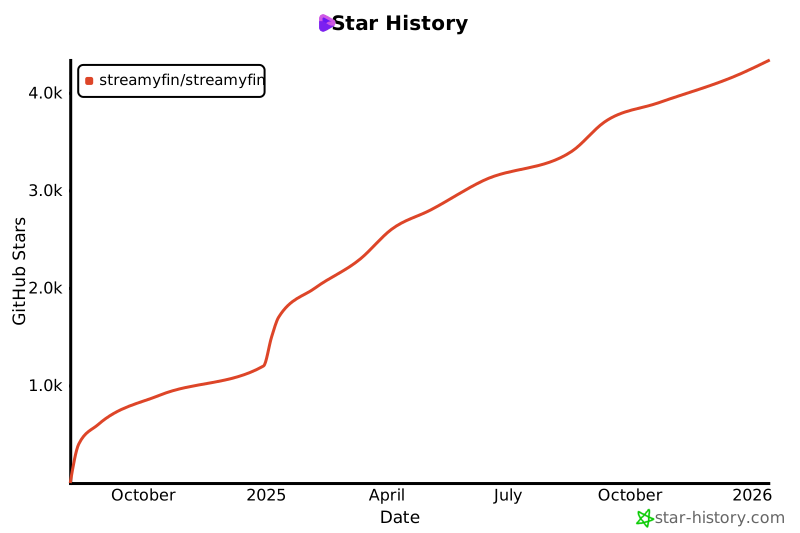](https://star-history.com/#streamyfin/streamyfin&Date)
## 📄 License
Streamyfin is licensed under the Mozilla Public License 2.0 (MPL-2.0).
This means you are free to use, modify, and distribute this software. The MPL-2.0 is a copyleft license that allows for more flexibility in combining the software with proprietary code.
Key points of the MPL-2.0:
- You can use the software for any purpose
- You can modify the software and distribute modified versions
- You must include the original copyright and license notices
- You must disclose your source code for any modifications to the covered files
- Larger works may combine MPL code with code under other licenses
- MPL-licensed components must remain under the MPL, but the larger work can be under a different license
- For the full text of the license, please see the LICENSE file in this repository
## ⚠️ Disclaimer
Streamyfin does not promote, support, or condone piracy in any form. The app is intended solely for streaming media that you personally own and control. It does not provide or include any media content. Any discussions or support requests related to piracy are strictly prohibited across all our channels.
Streamyfin does not promote, support, or condone piracy in any form. The app is intended solely for streaming media that you personally own and control. It does not provide or include any media content. Any discussions, support requests, or references to piracy, as well as any tools, software, or websites related to piracy, are strictly prohibited across all our channels.
## 🤝 Sponsorship
VPS hosting generously provided by [Hexabyte](https://hexabyte.se/en/vps/?currency=eur) and [SweHosting](https://swehosting.se/en/#tj%C3%A4nster)
Only the most recent stable release of the Streamyfin mobile app is guaranteed to include the latest security patches. **Running older app versions may leave you vulnerable to security risks**. Always update your app from the official App Store or Google Play Store as soon as updates are available. If you must run an older version, avoid using sensitive features (e.g., account management, payment methods) until you can upgrade.
This policy applies only to the current stable app release. Security flaws in previous app versions that are no longer present in the latest release **will not** be back-ported or fixed.
## Supported Versions of Other Streamyfin Components (Server, Plugins)
Most Streamyfin backend services and plugins are supported only in their latest release. Consult each project’s README or release notes for any exceptions.
## Vulnerability Triage
Before reporting an issue, please consider:
- Administrator-level risks: Certain administrative or configuration endpoints in the backend may inherently carry elevated privileges. Vulnerabilities that **require administrator or root access** are classified as low priority. Report those via normal GitHub Issues.
- Known vulnerabilities: We maintain a public list of known issues on our Security Advisories page at https://github.com/Streamyfin/Streamyfin/security/advisories. If your issue is already listed there, please do not re-report it.
- Local-only issues: Vulnerabilities exploitable only with physical device access, manual file modification, or local debugging (e.g., modifying app files, rooting/jailbreaking) are considered low- to medium-priority.
- Infrastructure reports: To report issues in our website, servers, CI/CD, or other infrastructure, tag your report subject with `[Streamyfin Infrastructure]`. Our infrastructure team follows standard patch policies for public vulnerabilities, so avoid duplicating widely known issues.
## Reporting a Vulnerability
After confirming your issue is new and relevant, send an email to **developer@streamyfin.app** with the following:
2. Overview (public-safe): Describe what component is affected (mobile app, backend API, plugin) and the high-level impact. We may reuse this text for a GitHub Security Advisory.
3. Details: Provide reproduction steps, code or API snippets, proof-of-concept, and any suggested remediation. Detail exactly how to trigger the issue.
4. Your GitHub username: So we can invite you to the GitHub Security Advisory (GHSA) for coordination and credit.
Once received, we will review the report, file a GHSA if warranted, and include you and the relevant teams in the remediation process.
## Post-Disclosure Process
Streamyfin is a volunteer-driven project. **We appreciate patience and do not enforce strict disclosure deadlines**, especially for complex issues. You may send polite follow-ups if there’s no response after a reasonable interval.
- Patch releases: For critical vulnerabilities, we generally issue a point release promptly unless a major release is imminent; in that case, we defer the fix.
- Advisory publication: After releasing a patched app version, we wait at least seven days (1 week) before publishing the GHSA to allow most users to upgrade. We request that any third-party disclosures (blog posts, advisories) occur **after** our GHSA publication.
- CVE assignment: We will request CVEs via the GitHub Security interface and include them in the published advisory.
"Are you sure you want to clear all cached data? This will clear all cached images, music files, subtitles, and query caches. Your settings and login session will be kept.",
),
[
{
text: t("common.cancel","Cancel"),
style:"cancel",
},
{
text: t("common.ok","OK"),
onPress: async()=>{
try{
// 1. Clear React Query Cache (memory & MMKV)
storage.remove("REACT_QUERY_OFFLINE_CACHE");
awaitqueryClient.resetQueries();
// 2. Clear expo-image cache (memory & disk)
awaitImage.clearDiskCache();
Image.clearMemoryCache();
// 3. Clear AudioStorage (music) cache
awaitclearAudioCache();
// 4. Clear TopShelf cache
clearTopShelfCacheSafely();
// 5. Clear Subtitle Cache
storage.remove("downloadedSubtitles.json");
constsubtitlesDir=newDirectory(
Paths.cache,
"streamyfin-subtitles",
);
if(subtitlesDir.exists){
awaitsubtitlesDir.delete();
}
// 6. Clear MMKV caches like extracted image colors and other non-essential storage keys
constkeysToKeep=[
"settings",
"serverUrl",
"token",
"user",
"deviceId",
"previousServers",
"hasAskedForNotificationPermission",
"hasShownIntro",
"multiAccountMigrated",
"selectedTVServer",
"downloads.v2.json",
];
constallKeys=storage.getAllKeys();
for(constkeyofallKeys){
if(!keysToKeep.includes(key)){
storage.remove(key);
}
}
// 7. Increment cache version to force remount of components
"Enter your OpenSubtitles API key to enable client-side subtitle search as a fallback when your Jellyfin server doesn't have a subtitle provider configured."}
Some files were not shown because too many files have changed in this diff
Show More
Reference in New Issue
Block a user
Blocking a user prevents them from interacting with repositories, such as opening or commenting on pull requests or issues. Learn more about blocking a user.
